A.5 Functions#
Function definition#
Functions are defined in Python with the def command. Functions may be stored in files, or they can be typed in code cells in the notebook or at the Python prompt in a console. The following function is implemented in the Python function func_one below.
def func_one(x):
    if x < 0:
        rv = np.cos(x)
    else:
        rv = np.exp(-x)
    return rv
The name of the function is func_one (it is proper Python coding style to use lowercase letters for functions and to separate words by underscores). The function returns the value of the variable rv that is computed inside the function. Typing func_one( followed by [Shift][Tab] in a code cell displays the input arguments of the function (and any documentation, if provided). Calling the function returns the desired values
print(func_one(1))
print(func_one(-1))
0.36787944117144233
0.5403023058681398
The function func_one cannot be called with an array because of the if-else construct, which only works for single numbers. There are two approaches to make func_one work on an input array. The first and easiest way is to create a new function that vectorizes the func_one function. The new function takes an array as its argument and simply calls the func_one function for every value of the array and then returns an array. A function may be vectorized with the np.vectorize function, which takes as input argument a function to be vectorized and returns a function.
func_two = np.vectorize(func_one)
func_two(np.arange(-2, 3)) # func_two can be called with an array
array([-0.41614684, 0.54030231, 1. , 0.36787944, 0.13533528])
The use of np.vectorize is easy, but not very fast. Behind the scenes, the func_two function simply creates a loop and loops over all the values in the array. Alternatively, the func_one function can be rewritten to accept an array as input argument. The np.atleast_1d function can be used to make sure that the input argument x is at least a one-dimensional array (so a scalar is converted to an array). The np.empty(x.shape) function is used to create an empty array of the same shape as x. Conditional statements are used to fill the array, which is returned at the end of the function.
def func_one_array(x): # fancy function that works on arrays
    x = np.atleast_1d(x)
    f = np.empty(x.shape) # return value is now called f
    f[x < 0] = np.cos(x[x < 0])
    f[x >= 0] = np.exp(-x[x >= 0])
    return f
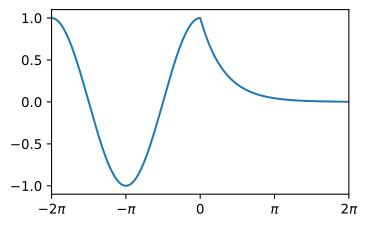
The func_one_array function is used, and a graph is created below. Note that the limits of the axes are set and fancy tick marks are added using list comprehension and a LaTex-style command to plot the Greek letter \(\pi\).
x = np.linspace(-2 * np.pi, 2 * np.pi, 201) # x values
y = func_one_array(x) # call the function to compute the y values
plt.plot(x, y)
plt.xlim(-2 * np.pi, 2 * np.pi) # set the limits along the x-axis
plt.xticks(np.arange(-2 * np.pi, 3 * np.pi, np.pi),
            ['$-2\\pi$', '$-\\pi$', '0', '$\\pi$', '$2\\pi$']);
Documentation of the function can be provided inside the function using triple quotes. This is, of course, proper programming style, but is not used in this book to save space.
def func_one(x):
    '''Documentation of the function goes here
    Returns:
    cos(x) for x < 0
    exp(-x) for x >=0'''
    if x < 0:
        rv = np.cos(x)
    else:
        rv = np.exp(-x)
    return rv
After running this cell, typing func_one( followed by [Shift][Tab] will show the documentation.
Function arguments#
A value that is passed to a function, like x in the previous examples, is called an argument. Functions do not always have an argument. Function arguments can be regular arguments and keyword arguments (or kwargs). Regular arguments always need to be passed and must be in the proper order. Keyword arguments are arguments that are optional for the user to pass, and the order in which they are passed does not matter. If a keyword argument is not passed, its value takes the default value that is specified in the function definition. When a function has both regular arguments and keyword arguments, the keyword arguments must always come after the regular arguments. These rules are illustrated in the following example where the function test has one regular and two keyword arguments.
def test(x, y=7, z=100):
    print(x, y, z)
test(3)
test(3, y=8) # or test(3, 8), but better to specify keyword
test(3, z=-1)
test(3, z=-1, y=8) # keyword arguments may be in any order
test(x=3) # regular arguments may also be called with their name
3 7 100
3 8 100
3 7 -1
3 8 -1
3 7 100
If a function takes no arguments, its definition must still include the parentheses. Similarly, calling a function also requires adding the parentheses.
def test():
    print('Hello')
test()
Hello
If a variable is used inside a function, but the variable is not explicitly passed to the function with a regular argument or a keyword argument, Python will search for this variable in the memory outside the function. This is generally considered sloppy programming, but it is sometimes done in short scripts, also in this book. So the following function works, but is not optimal.
velo = 0.05 # defined outside the function

def printflow(x):
    print(f'the velocity at x={x} is {velo} m/d')

printflow(100)
the velocity at x=100 is 0.05 m/d
It is better to pass all variables to the function
def printflow(x, velo):
    print(f'the velocity at x={x} is {velo} m/d')
printflow(x=100, velo=0.05)
the velocity at x=100 is 0.05 m/d
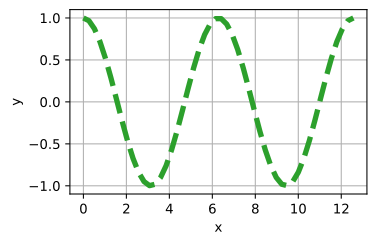
It can be useful to define a function in such away that any keyword argument may be passed to it, even if it is not known a priori or explicitly defined. This is useful if the function calls another function. The code cell below demonstrates how this works by defining a function kwargs_demo that creates a figure with a fixed layout, but with user-defined options for the way the data are plotted. By including **kwargs in the list of arguments for kwargs_demo, and passing them on to the plot function, all of matplotlib’s plot keyword arguments become available for use with the kwargs_demo function.
def kwargs_demo(x, y, **kwargs):
    plt.figure()
    plt.plot(x, y, **kwargs)
    plt.grid(True)
    plt.xlabel("x")
    plt.ylabel("y")

x = np.linspace(0, 4 * np.pi)
y = np.cos(x)
kwargs_demo(x, y, color='C2', ls='--', lw=4);
Packages#
Python code or functions can be defined in a separate file with extension .py. Such a file can contain one or many function definitions. Storing functions this way avoids the need of having to define them repeatedly, and it allows functions to be shared and distributed easily. A set of functions that perform a similar task is called a package. Packages can consist of many different files and can have a complex structure, which is not discussed here.
There are many different ways to import packages. Using the numpy package as an example, the most basic syntax is import numpy after which any function in numpy can be called as numpy.function_name(). Alternatively, all of numpy’s functionality may be imported with from numpy import * This allows numpy’s functions to be called without prefixing numpy to the function name. However, importing libraries this way is generally discouraged as any relation between the functions and packages is lost. A better way is to use import numpy as np (as used before and as is standard practice in the Python community). This makes it possible to write compact code while maintaining the relationship between the package and everything defined in it. This is important for programs that rely on multiple packages, as similar names may exist across packages. By prefixing the package name to a function name, the programmer has certainty that the intended function indeed gets called.
Packages can also have subpackages. The pyplot subpackage of matplotlib was already imported earlier using import matplotlib.pyplot as plt. Another example of a subpackage is the linalg package of numpy, which is a collection of functions that deal with linear algebra. If the numpy package is imported with import numpy as np, the functions in the linalg subpackage can be called np.linalg.function_name().