A.6 The scipy package for scientific computing#
The three main Python packages for exploratory computing are numpy, matplotlib, and scipy. The numpy and matplotlib packages were already discussed in previous examples. Here, some of the functionalities of scipy are demonstrated, including root-finding, minimization, special functions, and numerical integration.
SciPy optimize functions#
The function fsolve from the scipy.optimize package can be used to find the root or roots of a function. In the code cell below, the root of the function \(f(x) = \text{e}^{x/5} - 2\) is found numerically using the fsolve function (it can, for this case, also be computed analytically, of course). A starting value for the numerical search must be supplied. The closer the starting value to the root, the more likely (and the quicker) fsolve finds the root.
def ffunc(x):
    return np.exp(x / 5) - 2

from scipy.optimize import fsolve
xroot = fsolve(ffunc, x0=0) # start searching at x0=0
print(f'root={xroot}, function value={ffunc(xroot)}')
root=[3.4657359], function value=[2.7533531e-14]
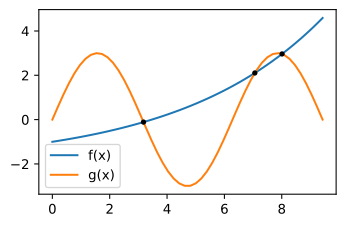
Next, three points are found where \(f(x)\) intersects the function \(g(x) = \sin(x)\). The function fdiff computes the difference between \(f(x)\) and \(g(x)\), and fsolve is used to find three roots of fdiff for three different starting locations; that is, fsolve finds three points where the two functions intersect.
def gfunc(x):
    return 3 * np.sin(x)

def fdiff(x):
    return ffunc(x) - gfunc(x)

x_intersect = fsolve(fdiff, np.array([3, 6, 9])) # 3 starting points
x = np.linspace(0, 3 * np.pi)
plt.plot(x, ffunc(x), label="f(x)")
plt.plot(x, gfunc(x), label="g(x)")
plt.plot(x_intersect, ffunc(x_intersect), 'k.')
plt.legend();
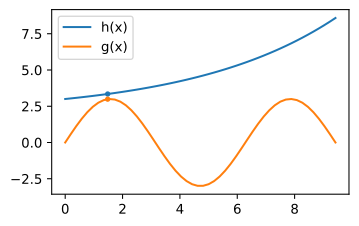
The minimum of a function may be found with the fmin function of scipy.optimize. The code cell below finds the \(x\)-location where the difference between the functions \(g(x)\) and \(h(x) = \text{e}^{x/5} + 2\) is the smallest, starting the search at \(x = 1.5\).
def hfunc(x):
    return np.exp(x/5) + 2

def fdiff(x):
    return hfunc(x) - gfunc(x)

from scipy.optimize import fmin
xmin = fmin(fdiff, 1.5)

plt.plot(x, hfunc(x), label="h(x)")
plt.plot(x, gfunc(x), label="g(x)")
plt.plot(xmin, hfunc(xmin), 'C0.')
plt.plot(xmin, gfunc(xmin), 'C1.')
plt.legend();
SciPy special functions#
Two other subpackages of the scipy package are scipy.special for special functions and scipy.integrate for numerical integration. As an example, consider the exponential integral defined as
\(\text{E}_1\) is available as exp1 from the scipy.special package, but can also be evaluated using numerical integration. The quad function of the scipy.integrate package is used and takes as input the function to integrate and the lower and upper limits of the integration; use np.inf for \(\infty\). Note that quad returns two values: the outcome of the numerical integration and an error estimate. The results of the numerical integration and the special function are compared below for \(\text{E}_1(1)\).
from scipy.integrate import quad
from scipy.special import exp1

def integrand(s):
    return np.exp(-s) / s

E1num = quad(integrand, 1, np.inf)[0] # numerical integration

print('E1(1) from numerical integration:', E1num)
print('E1(1) from special function exp1:', exp1(1))
E1(1) from numerical integration: 0.2193839343955124
E1(1) from special function exp1: 0.2193839343955205